Exploring the Dot Marker Typeface
There is a specific kind of magic in a toddler’s first interaction with a do-a-dot marker. That distinct, rhythmic thump-thump-thump on paper creates a pattern that is both chaotic and structured. As designers and content creators, we often seek to capture that raw, tactile energy in our digital work. This is where the Dot Marker font enters the conversation. It isn't just a typeface; it is a translation of a classic preschool activity into a scalable vector format. If you have ever struggled to find a typeface that feels genuinely homemade without looking messy, this font offers a compelling solution.
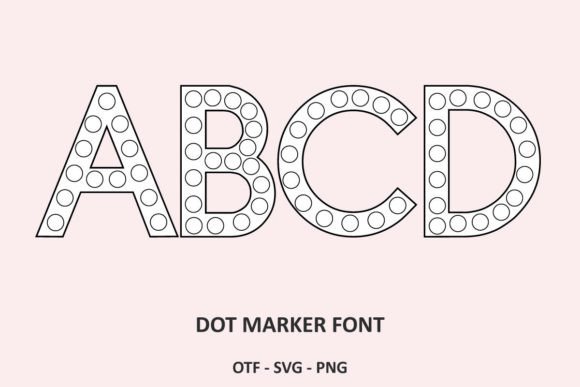
At its core, the Dot Marker font mimics the visual impression of a bingo dauber or a sponge-tipped applicator pressed against porous paper. The visual characteristics are defined by irregular circles that form letters and numbers. Unlike a standard sans serif font or a polished script font, the Dot Marker style embraces imperfection. The "ink" coverage varies, and the edges are not perfectly smooth, giving it a distinct personality. It feels approachable, energetic, and incredibly tactile. For those working in education, parenting, or the broader "maker" community, this aesthetic is instantly recognizable and nostalgic.
The Visual Language of Playfulness
Understanding the personality of a typeface is crucial for effective branding. The Dot Marker font speaks a language of playfulness and accessibility. When you use this creative font in a layout, you are immediately signaling to the viewer that the content is intended to be fun, informal, and user-friendly. It strips away the corporate stiffness often associated with traditional typography. There is no intimidation here, only invitation.
However, it is important to view this through the lens of professional application. This is not a font you would use for a legal disclaimer or a high-end luxury brand (unless that brand is intentionally subverting expectations). Instead, it thrives in environments where engagement is the primary metric. The visual weight of the dots creates a strong texture. Because the letters are formed by circles, they have a unique rhythm. When set in a block or a headline, the font creates a visual pattern that is almost decorative, functioning almost as much as a graphic element as it does a reading tool.
Practical Applications for Creators and Entrepreneurs
For the entrepreneur or small business owner, the utility of a font like Dot Marker extends far beyond simple worksheets. While it is the perfect tool for creating alphabet worksheets for toddlers, its application in broader design contexts is where the real value lies.
Consider the world of packaging design. If you are launching a line of artisanal children’s snacks, organic bath products for kids, or educational toys, the Dot Marker font serves as an excellent primary or secondary display typeface. It conveys a sense of "homemade" or "crafted with care" that resonates with parents. It works beautifully on labels, hang-tags, and thank-you cards. Because it is a display font, it commands attention when used at larger sizes, making it ideal for headlines on a website landing page or the title of a blog post.
In the realm of social media graphics, standing out is difficult. A clean, minimalist serif font is safe, but a Dot Marker font is distinctive. It adds a layer of texture to flat digital images. Imagine an Instagram story promoting a "Kids Eat Free" event at a local restaurant, or a Pinterest pin for a DIY slime recipe. Using this font instantly aligns the visual message with the target audience. It breaks the monotony of the feed because the irregularity of the dots catches the eye differently than standard typography.
Font Pairing and Visual Hierarchy
One of the most common mistakes I see with handwritten fonts or novelty typefaces is poor pairing. Because the Dot Marker font is so stylistic, it requires a grounding element. It has high "visual noise" due to the texture of the dots.
To create a professional brand identity, you must balance this texture with simplicity. Pair the Dot Marker font with a clean, geometric sans serif font for body text. A font like Open Sans, Lato, or Montserrat works exceptionally well. The neutrality of the sans serif allows the personality of the Dot Marker to shine without overwhelming the reader.
Use the Dot Marker strictly for visual hierarchy. It should be reserved for:
- Headlines and Titles: Grabbing attention with large, dotted letters.
- Call-to-Action Buttons: "Click Here" or "Learn More" in a Dot Marker style feels less aggressive and more playful.
- Accents: Using the font for single words like "New!" or "Sale" to draw the eye.
Avoid using it for long paragraphs of text. At small sizes, the dots can merge, reducing readability. The font is designed to be an accent, not the workhorse of your text-heavy documents.
Creating Educational and Interactive Content
Returning to the font's origins, its utility in editorial design and educational publishing is undeniable. As a publisher or educator, you can use this font to create "Do-a-Dot" style worksheets. This is where the font truly excels. You can type out letters, numbers, or shapes, and the resulting printout looks exactly like a stamping activity.
This has practical value for homeschooling parents and preschool teachers. Instead of buying expensive physical workbooks, they can generate custom content. For example, a blogger focusing on early childhood education could create a downloadable PDF featuring the child's name written in the Dot Marker font for tracing or stamping practice. This adds immense value to a digital product.
Furthermore, the font can be used in web design for sites catering to this demographic. It sets the tone immediately. When a parent lands on a site designed with this typography, they understand the site's purpose without reading a single word. The typeface acts as a visual shorthand for "kid-friendly content."
Licensing and Commercial Usage
When selecting design assets, the boring stuff matters. Before you download and integrate the Dot Marker font into your next big project, verify the licensing. Most premium fonts come with specific tiers. A "Desktop" license usually covers print media, logos, and static images. However, if you are planning to use this font in a mobile app or a website where the font file is embedded and rendered by the user's browser, you will likely need a "Webfont" license.
If you are selling the worksheets you create with this font, check the license for "End Products for Sale." Some fonts allow it; others require an extended license. Since the primary use case for this specific font is creating printable products, this is a critical detail to verify. Always respect the type designer's work by adhering to the terms.
Evaluating Fit for Your Brand
Does the Dot Marker font fit your brand? Ask yourself these three questions:
- Who is my audience? If your audience is children, parents, or teachers, the answer is likely yes. If your audience is corporate executives or luxury shoppers, the answer is no.
- What is my medium? It works well for print, large digital headers, and merchandise. It works poorly for legal documents, technical manuals, or small mobile text.
- What is the vibe? If you want to convey structure and authority, choose a serif. If you want to convey fun, creativity, and approachability, the Dot Marker is a strong contender.
In the crowded landscape of modern typography